Translate

Monday, 23 December 2019

Something Old and Maybe Something New or Even Blue

Its that time of year when we start looking back at previous years.

So what better way to do this than go through all my computers I have had.

Photo From wikipedia
I guess it all started in 1980 with a Sinclair ZX80. My parents got me one of these for doing well in my exams. When it arrived I was in heaven, I felt like the bridge of the Enterprise had arrived in my bedroom. I was after all only 13.
16kB Ram Pack
 With it massive 1kB of memory that has considered large at the time. It was the first sub £100 computer it came in to version a build and solder it yourself for £79.95 (£337 in today's money), or a ready assembled version for £99.95 (£421 in today's money). There was quite a waiting list and I got it about three weeks after it was ordered. I bought some games from Bug Byte 4 on each cassette a version of Lunar Lander was my favourite. After about a year I upgraded to the immensely huge 16kB addon ram pack This allowed bigger programs to be written, mind you the longest I wrote by hand filled about 1.5kB. But I was still in heaven. I wrote a couple of maze type games and even a program to help with my maths home work.
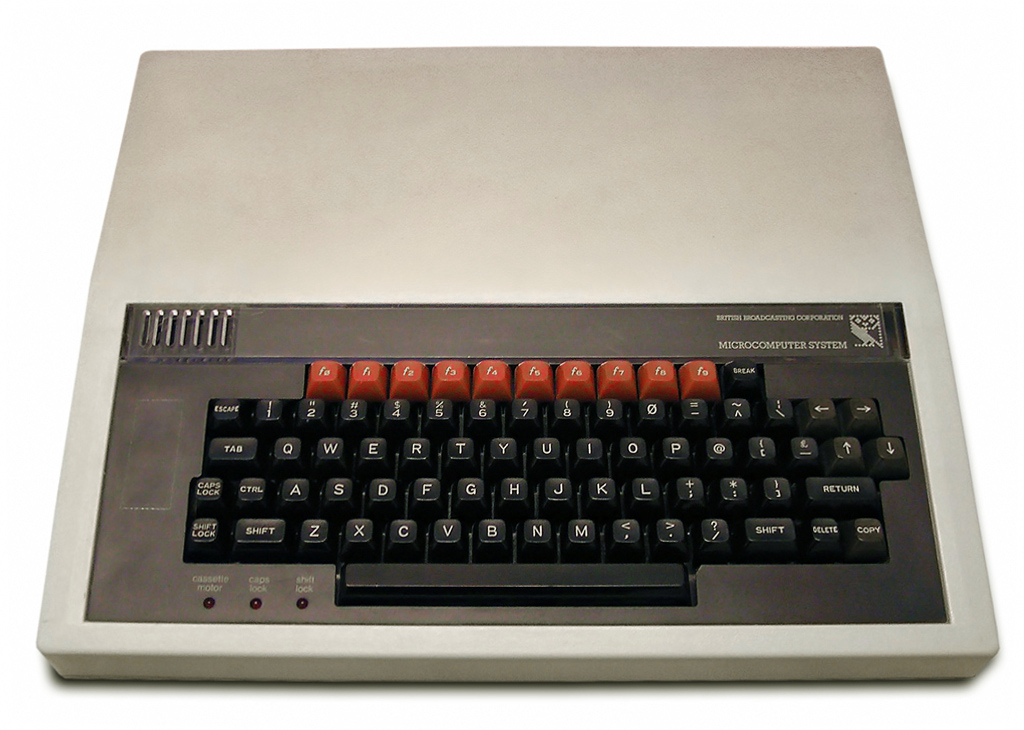

BBC Micro, Photo from wikipedia

''After the ZX80 I went straight for a BBC Micro Model B £335 (£1,161.42 in todays money), and another long wait. Being an early adopter of the Beeb meant I was an instant member of the school computer club, they got their Beebs about 2 months after I got mine. I also gained entry into the hallowed VIP room and even had my own key for this room.  Had a few issues getting it to work with my cassette player, so bought a mega cheap one and this worked fine.
Viglen PC Case
Later on I installed the floppy disc controller and had a 5
¼" floppy drive, and copied a lot of my cassette based games over to floppy. It was in 84 that I got Elite and I am still playing it now or rather the new version Elite Horizons. I did a few upgrades added more memory, made an audio interface for the analogue input socket and plugged this into my HiFi and wrote an audio visuisation program that by todays standards would still look pretty cool, even did an anaglyph  3D version which at the time was truly amazing. I then got the Viglen (Amstrad bought them out in 1994) Computer case which made the BBC more like a PC. 

My next computer was the  Acorn Archimedes 410/1 I got this in 1989 after my first year at work for £999 (£2,441.56 in today's money). I loved it, mind you I have loved every computer I had. At the time it was rather radical and was probably the fastest home PC on the market at the time. I kept this computer for about 6 years, adding more memory and a few other tweaks here and there. This computer also never crashed, something that can't be said for today's computers. 


I was an Acorn Junkie so my next PC was also from Acorn this time it was the Risc PC.  It came with a 180mB hard drive the PC emulation card, so I could run PC software such as Doom. Like the Archimedes the main operating system was stored in Rom with only a few libraries, that needed to be written to stored on the hard drive, on the 410 these wehre often on the floppy that the program came on. This gave you a very fast boot up time, something at that time with Windows 3.1 based PCs you could only dream of, and something we can only do now with Windows 10.  The case was an excellent design concept and often referred to as the pizza box. I had the same as in the picture. Like the 410 this never crashed, well apart from when a lightening strike took out the main sub station, but that doesn't really count as it was a loss of power. My house had a main power filter and I built some extra ones for the computer and my Hifi  system. 

By about 1993 I decided it was about time a built my own PC, which is what I did. Where I worked at the time, due to the licensing agreement with Microsoft, I was able to get a copy of Windows 3.11 for free, and a lot of other Microsoft software free as well.  
 I have always built my own PC except once when I bought an HP with Windows ME (stands for Multiple Errors) on it, worst PC I ever bought continually crashing, at least once a week. I then upgraded to XP almost as soon as it came out, as I had a free upgrade voucher. Yeah this will solve all my crashes and various other problems, it didn't. So came to the conclusion that it was just poorly made and had poorly executed drivers. So a year later about 2001 to 2002 built a PC and Installed XP pro on it. This crashed but not as often as the HP did. So from that day on I have never bought a desktop PC, I have always built my own. 


Monday, 4 November 2019

Blackview BV9700 Pro Review

I have finally decided to upgrade my phone.

Spent about a month looking for one, and decided I wanted to go for a rugged one.

Liked the look of the Doogee S60, but after seeing so many mixed reviews decided against it.

Then I discovered a company called Blackview, they have an office in Spain. The main company is based in Hong Kong.

So I went for the BV9700 Pro. Their online shop had it out of stock so got it from Amazon, I decided to go for the more expensive version which comes with a nightvision camera add on, more about this later. I paid 409.99 euros for mine, if you want it without the external camera it costs 388.99 euros. Which considering the cost of some phones is quite a good bargain, considering a Samsung A80 is about 500 euros and its not even water resistant let alone waterproof.


Specs

  •  CPU - This is an octa core MediaTek MT6771V Helio P70  (4 x Arm Cortex-A53 2.0GHz and 4 x Arm Cortex-A73 2.1GHz) 
  • GPU Arm Mali-G72 MP3 900MHz
  • Multi-Core APU 525MHz
  • Ram 6GB
  • Rom 128GB
  • Battery 4380 mAh
  • Screen Amoled, FHD with notch, 5.8"
  • Resolution 1080 x 2280
  • Two Samsung rear cameras 16 Mpixel and 8Mpixel
  • Front Samsung camera 16 Mpixel 
  • Waterproof USB C port
  • Dual nano sim or one nano sim and one TF memory card
  • Fingerprint sensor
  • OTG
  • Compass
  • Bluetooth
  • Android 9.0
  • Wifi 
  • GPS + Glonass + Beidou
  • Supports Wireless charging @10W and fast charging.
  • IP68 / IP69K / MIL-STD-810G
  • Air quality sensor
  • NFC
  • Weight 283g
So what is it like. 

Picture taken from Blackview website.

Unboxing the phone you get the phone complete with a screen protector already attached, just carefully peel off the top layer. A charging cable and rapid charger, and a USB C to USB C adaptor. The USB C socket is a little deeper than a normal one. The supplied charging cable doesn't need the adaptor so I guess they added it if you want to use a different USB C cable. And of course a manual more about this and the adaptor later. 

The first thing you notice is that its not a small phone and it is a little heavy, but fits well in my hand. It definitely feels solid and well built.  The buttons are easy to access and have a nice feel, the main power button and the smart button have different textures to them so you can easily identify them in the dark. 

 In use the phone is great, I have always struggled to use my smart phone as an extension of the office. Reading emails was ok but never really got on with writing them on the phone. This phone has changed that. I have been able to answer emails on it when out and use it more like an extension of the office when out and about.

Warning the manual is worse than useless, its actually a cut and paste from another phone so some of the instructions are wrong. Inserting the sim card for example tells you to insert a tool into the pin hole to eject the sim card drawer. That's actually completely wrong. You just insert a small screwdriver into the slot above the TF/SIM CARD cover and carefully pry the drawer open.  The drawer then pops out, and you can now insert your sim card or two and push it back in. This is perhaps the only bit that might over time be liable to fail, if you change sims cards or TF cards often. I think for most people who insert and forget it should be ok. 

Over the years Google has made it much easier to move to a new phone, and this time it was by far the least troublesome. All of my contacts and most of the apps got transferred over to the new phone with out much input from me. So I would say in general it was a much better experience than in the past.

The fingerprint sensor is very good and unlock takes milliseconds if not quicker. Its as quick as just touching the sensor. This is a vast improvement over my old phone an Ulefone Betouch3 which had a noticeable delay.

The other thing with the fingerprint sensor is it can be used as your login to various apps that support fingerprint log in. This means that I can log in to my two banking apps using the fingerprint sensor, and various other apps which require passwords to login. Which my old phone couldn't do.

With it having an NFC sensor I was quite keen to store my cards on it. So one of the first things I did was set up Google pay with my debit cards. The only problem I had was that only one of my debit cards worked and the other one from a different bank didn't. Went in to see my bank about the card not working. They told me I had to use their own wallet app. Downloaded their wallet app added my card, and it doesn't work.  Google pay works very well and is quite useful, no more fumbling for my debit card just whip out the phone select Google pay and tap the card unit. 

Of course since its waterproof you are going to want to try it underwater. The phone has no extra protection for the USB C socket, which has concerned many people. The new Iphone Xr  has no cover on its socket either and that is also waterproof.  One thing I have noticed is that a standard USB C plug doesn't actually fit. The Blackview one is a little longer. This might have something to do with the waterproofing. I have noticed that there is a very small amount of resistance when pushing it in. ( I did see a review on amazon where the purchaser said he couldn't get the phone to charge I don't think he pushed the cable in far enough) I think what is happening is you are pushing against a small sprung loaded door, which seals the socket from water.  Which is why the depth rating is 1.5m for no more than 30mins, (any more and the door starts to open, as I said its my theory so may be completely different in reality). 

To take photos underwater you must first put the phone in underwater mode this then disables the touch screen. Then volume up becomes take photo and volume down selects mode, so you can also shoot underwater video (didn't try this). The photos look amazing and are on par with the the Iphone Xr, which my daughter has. To exit just push the power button. This button has a red ring round it so its easily identified. 

The add on night vision camera is an optional extra which I went for. First of all you have to install the software via a QR code. But wait what you actually need to do is install a QR code reader app to do this, since the phone doesn't come with one.. Once the Night Camera app is installed it opens straight away when the night vision camera is plugged in via the USB C socket. This external camera is not water proof or  shockproof which is a shame. 


This is a video using the Night Vision Camera


This video is taken with the phone's camera


Picture quality in low light is the best I have ever seen, as can be seen on the two videos posted here. Its also pretty good in daylight and would make a good dash cam on a car, motorbike or bicycle. The camera itself has a sprung loaded clip so it can be mounted almost anywhere. It has two buttons on it one for pictures and the other for video, the button block also has a small  hole where the microphone is.  The lens is protected with a lens cap when not in use so can be stowed away with out worrying about scratching the lens when you don't need it. Would have liked to have seen some sort of lens cap keeper as I can see the cap getting lost.


Battery life is very good, it took me 38 hours of average use to get it to 15%. By average use I mean web browsing, checking emails, playing the odd game (nothing fancy like Fortnite or PUBG) and the odd 5 minute Youtube video. So you should easily get a good days worth out of it with heavy use.


The phone can also be charged wirelessly , but make sure the wireless is charger is rated at 10W and not 5W. The first one I bought which looked like a beer mat didn't work as it was rated to 5W, but works on the iPhone Xr. The second one I bought which is more like a phone stand works well. 


The phone comes with selection of pre-installed toolbox apps. 

The main one for me is the air quality monitor, so when I am crawling around in the crawl spaces under houses I will know if its safe. (I install home automation systems and home networks when I'm not blogging) Some of the others could be useful depending on what job you do. 

The heartbeat monitor works well but don't press the sensor on the back to hard as it won't work. Many people think this is the fingerprint sensor.

Haven't used any of the other toolbox apps there are 15 in total (14 if you don't have the night camera add on) ranging from Sound meter, compass, pedometer to plumb bob.

So Pros and Cons:

Pros:
Excellent value for money
Night vision camera a good add on.
Useful set of toolbox apps
Fast response from phone
Good amount of storage 128Gb
Wireless charging 
Battery life

Cons:
Some might find it heavy (but hey its a rugged phone)
Instruction manual rubbish at best
Night vision camera not easy to install
No QR code reader app (which you need to install the night vision camera)


Monday, 16 September 2019

Voyo i8 Android Tablet

I have had my Voyo Tablet for about 9 months now, and its rubbish. And I haven't used it for abut 3 months. The battery life is appalling, lucky to get 90 minutes out of it on a good day. 

 The tablet has developed a small curve, and the front screen bezel has started to pop out and I think because of this it has caused the touchscreen to malfunction from time to time, its a shame because it looked quite good on paper. It might be a fake one. I am going to contact Voyo about it and see what they can do. So no review about it.
The photos below show the curve and the pooped front bezel.


Spot the curve

Screen Bezel 


Friday, 28 December 2018

Whats coming next??

My next few post will be reviews. I will be reviewing the MK Bradshaw smartwatch and the VoYo Deca core tablet.
So watch this space.

Tuesday, 18 December 2018

XuanPad Projector review Part two. The Nitty Gritty

So can a £64.99 (mind you if you hurry you might be able to get it at £48.99 from Amazon) be any good. Well lets find out shall we.

I have been toying with the idea of a cheap projector for some time. But until recently the native resolution was awful and there was no keystone correction. That has all changed with quite a few budget projectors now giving better resolution and keystone correction.

 So lets look at the specs.


  • Projection Tech: LCD
  • Lamp life time: 55000 hrs
  • Contrast:2000:1
  • Projector consumption: 50W
  • Correction Optical: ±15 degree<>
  • A single continuous use time: <24hour
  • Projection size: 32-170inch
  • Projection Distance: 1.5-5m
  • Brightness 2400 lumens
  • Max display resolution 1080p Full HD


  • On paper it looks quite good, but as explained in part one things may not be what they seem.

    The native resolution is actually 800 x 480 this is what they call WVGA (Wide Video Graphics Array ) this gives an aspect ration of 15:9 so its almost 16:9.  
    The manufacturer claim its brightness is 2400 lumens but after a couple of my own tests with a light meter I reckon the ANSI lumens are about 600 to 800. 

    The continuous use time is an interesting one, but at least is doesn't say 4 hours which I have seen on some. 

    So what's it like to actually set up and use. 

    It feels fairly solid for something that's made out of plastic, the projection lens is solid so no wobble when you try to focus. Nothing worse than a loose projection lens. 

    It has a small tilt adjustment screw at the front, which is useful. 

    Focus is manual as is the keystone correction.  Both work fine for a manual system.

    The imstruction manual is useless. It basicaly says you have bought a projector and this is what the buttons do, with little if any actual usage instructions. I found out most of the functions by playing around with the menus.

    Another menu option is for timer functions so you can set the projector to come on/off at a preset time. Or the sleep function which can be set to say go off after 30mins right up to 6 hours. 

    The remote has various buttons for on/off, arrow keys for navigation, you can flip the picture, so you can mount the projector upside down, or allow for back projection. The zoom button just switches between Auto, 16:9 and 4:3 aspect ratios. I found the remote needs to be pointing directly at the front or back of the projector. I use an ir repeater and the remote works much better. So if your projector is behind you or above you then consider getting an ir repeater, I bought mine a few years ago on ebay for less than 10 euros.

    Size of image depends on projection distance, so at 1.5m its about 32inch. At 2.3m the picture size is about 73 inches. There is an option in the menu to reduce the picture size by up to 25%. I would say optimal image size is about 70 to 100 inches.

    There are various inputs VGA, HDMI, composite video and USB. The USB is great for inserting a USB stick with films on it. It handles most formats, but struggles with some mkv files.  

    Picture quality I think for the price is great. Its somewhere between VHS and DVD. Don't sit too near to the screen as you will be aware of the pixels.  I have tried the projector on a 4:3 DaLite screen and on a smooth plastered wall. To me the flat wall gives a slightly better picture. Mind you my DaLite screen is at least 15 years old, and needs a good clean. 

    Fan noise is audible but as long as you don't sit next to it its not really a problem. Amazingly it doesn't get that hot even after 4 hours of use. Some  cheaper ones I have tried get very hot indeed.

    The sound from the built in speaker is ok, though can be a little trebbly at times. So external speakers would be a better option. 

    The specs from the manufacturer say not to be used for power point presentations or spreadsheets. I would agree the picture quality for these is not fantastic, and the text can be unreadable at times if its small. If you had to you could use it, but you would need to change font sizes to make it more readable, ok for a one off I guess.

     So to wrap up. 

    Pros:
    I think its a great piece of kit for the price. 
    Would I use it as a main TV source probably not. But it would be ideal in say a bedroom. My kids loved watching, films in the bedroom.
    Its great for occasional / temporary home cinema use especially if you don't have a dedicated room. 
    Its ideal to use outside at night for alfresco picture shows.
    It would also make a great back up or second projector for a small school or work place environment especially if its used more for showing videos rather than spreadsheets or PPT presentations. 

    Cons:
    Not to be used on a daily basis for spreadsheet or other computer based presentations. 
     I wouldn't recommend it for a purpose built home cinema room ( I would want  better picture quality).
    Only manual keystone correction and focus (but at the price it is you wouldn't expect anything else).

    Important question: Would I buy one ? 
    Answer: Yes and I already have. 

    Its in my bedroom projecting on to a wall. So I now have a 75inch TV for less than £50.00 . 


    Thursday, 6 December 2018

    XuanPad Projector Review Part One. Projector Terminology

    There seems to be a plethora of cheap projectors from various manufacturers and suppliers, but are they worth the money, or is it better to splash out a little more cash.

     Before I start the review I think it is necessary to explain a few things about projectors in general.
    And they are;

    Native resolution this is the true resolution of the projector. Just because the blurb says HD compatible, HD support, maximum resolution or you can watch HD movies. Means it might not actually be a proper HD projector.  But what a non HD projector does is to convert the HD signal (often referred to as downscaling) to its native resolution.  I know a few people who have bought so called HD compatible projectors only to find out that the native display resolution is only 320 x 240 (often referred to as QVGA). Basically the higher these numbers are the better the picture quality.  Full HD is 1920 x 1080 and HD is 1280 x 720. See Wikipedia for more information.

    Aspect ratio is something to also consider this is usually stated as 4:3 or 16:9. 16:9 (often called sixteen by nine) is the industry standard format when it comes to widescreen TV. Which when converted to what the cinema industry use is 1.78:1  (the most common cinema format is 1.85:1) So ideally you want a display resolution that gives you something close 16:9 or 1.85:1 To work out the aspect ratio you divide the first number in the resolution by the second. So a resolution of 320 x 240 = an aspect ration of 4:3 or 1.33:1 and a resolution of 1920 x 1080 = 16:9.

    Contrast ratio this is the ratio of reflected light of a white image compared to an all black image. The higher the value the better. Again the higher the value the better. So a ratio of 2000:1 is better than one of 800:1. 

    Brightness measured in lumens. This is how bright your picture will look. and you've guessed it the bigger the number the better. But some manufacturers incorrectly measure this value to give their projectors a higher value. The lumen is based on distance from the light source. Sometimes its referred to as ANSI lumens, this is the standard for projectors (American National Standards Institute). But lumens aren't the same as ANSI lumens. ANSI lumens are an average of various measurements taken across the light source. If the projector doesn't state ANSI lumens but just lumens you can guarantee the ANSI version will be lower. Searching online I found many use the ratio of 6:1 or 4:1 to calculate ANSI lumens from lumens. So a projector claiming 2000 lumens may only have an ANSI lumen figure of between 333 and 500 ANSI lumens . So if a supplier is claiming 2000 lumens and another is stating 700 ANSI lumens the higher figure might not be the best. 

    Keystone correction.The keystone effect is the distortion of an image either being projected on to an angled surface or the projector being angled and displaying on a flat surface, giving you a trapezoidal shaped image.  A projector that has keystone correction will correct this effect.


    LCD Projector
    XuanPad Projector

    In Part two we will review the £64.99 (As of December 2018 Amazon currently has it on offer at £48.99) XuanPad projector, will it be worth the money or should you splash out for a more expensive one. 


    Friday, 30 November 2018

    Windows Scams Part 2

    Microsoft has finally had enough of the Windows scammers. Apparently it generates about 1.5 billion dollars a year. 

     Microsoft has a special digital crimes unit and they have received over 11,000 calls a month about fake security issues and many Windows users have lost quite large sums of money.

    So Delhi police raided various call centres that have been linked to these scams. 16 were carried out this week and earlier this month, another 10 locations were raided.

    The raids were due to Microsoft filing complaints with police in New Delhi about these so  called Windows Call Centres.

    Its nice to know that Microsoft actually does do something about it. And this should encourage more people to report these scams.

    According to the New York Times some people caught out by these scams ended up paying $1000 for the fake support. 

    Mind you according to the BBC, last year one person in the UK lost £1200 pounds to these con-artists.

    Well hopefully we will get less of these nuisance calls.


    Friday, 16 November 2018

    Windows Update Part 6, no it really is Part 6


    Is it true surely not. Has Microsoft finally fixed the fix for the fix..... . It looks like the Windows 10 October update is finally coming to a computer near you soon, its only six weeks late.

    Microsoft seems to have fixed the problems now. But rather than rolling it out in one go, they are going with a somewhat staggered approach with its deployment.  

    John Cable (Director of Program Management, Windows Servicing and Delivery) stated in his blog on 13th November 2018;

     "In addition to extensive internal validation, we have taken time to closely monitor feedback and diagnostic data from our Windows Insiders and from the millions of devices on the Windows 10 October Update, and we have no further evidence of data loss.  Based on this data, today we are beginning the re-release of the October Update by making it available via media and to advanced users who seek to manually check for updates.

    As with all Windows releases, we will continue to carefully study the results, feedback and diagnostic data before we begin offering the update in phases to more devices in the coming weeks and months."

    He goes on to say;

    "While the April Update had the fastest Windows 10 update rollout velocity, we are taking a more measured approach with the October Update, slowing our rollout to more carefully study device health data. We will offer the October Update to users via Windows Update when data shows your device is ready and you will have a great experience. If we detect that your device may have an issue, such as an application incompatibility, we will not install the update until that issue is resolved, even if you “Check for updates,” so you avoid encountering any known problems. For those advanced users seeking to install the update early by manually using “Check for updates” in settings, know that we are slowly throttling up this availability, while we carefully monitor data and feedback."

    So hopefully if your machine has compatibility issues with a Windows update it won't just apply the update it will wait until your machine is ready. Don't hold your breath as I am sure this will provide Microsoft with new problems, or as a guy I used to work with once said as a joke;

    "Didn't you know Windows never has an errors or problems they just call them interesting features" 

    So fingers crossed and a quick prayer to the god of computers and we my finally have a pleasant Windows 10 update experience. 


    Monday, 12 November 2018

    Windows Update part 5

    There are so many parts to this story now, its getting a bit tedious.
    So Microsoft have issued a fix  to fix the fix that should have fixed the update, I think you get the idea.

     But The Windows 10 1809 update is still causing a few headaches with file operations. A new version is out there for testing by the Insiders.

    It now appears there are problems with compressed files, these often have the .zip label.
    Its only a problem if you let windows handle them. If you use a program like Winzip or similar then you are OK. 

    Personally I have always used a third party program such as  Winzip,  WinRar or the 7-zip (this is the one I use at the moment as it is free) to compress and uncompress files. 

    The initial problem with the update that deleted files seems now to be a result of many people using more than one drive in their computer. 

     Its now common practice to install Windows on an SSD (Solid State Drive, think really big USB drive but more like a normal hard drive) and have all the other stuff such as your programs, documents on a standard hard drive. The SSD can be accessed much faster than a conventional drive so it means a slightly faster computer. So why Microsoft haven't caught up with this way of building computers I don't know. You would have thought Microsoft would be on top of things like this. 

    I am sure there is more to come on this saga. 


    Wednesday, 24 October 2018

    Windows Tech Support Phone Scam

    I have now had 4 calls from so called Windows support.  This is a scam. 
     All the numbers are similar, but may not be an indication of where they are based.

    The call normally starts off with them saying "Hi I am calling you from Windows" they will go on to say that there is a virus on your machine and this is the reason for the call.

    They explain how you can detect if there is a problem by taking you to what is called the Windows Event Viewer.  The viewer logs harmless errors. What the scammers do is then ask you to read out some of the numbers you see. Their reply will always be you have a virus and need to download some software.  They will often direct you to a website to download it I do know of incidents where they email you the software.  You are then asked to install this software.The software then takes over your computer remotely. They will then detect this mythical virus and demand payment for its removal. If you don't comply they will either encrypt all your files or remotely change the computer password or both. 


    Remember Microsoft will never make unsolicited call, emails  to provide tech support, or ask for financial details.

    What do you do if you have been affected already. You can go to Microsoft's website page about these types of scams. Or report them directly to their Report a Technical Support Scam page. 

    I am waiting for the next call as I am going to string them along, by wanting double glazing. After all they did they say they are from Windows. 

    In case you are wondering the phone numbers they use are 

    1. 00 1 585 410 2495
    2. 00 1 585 410 6036
    3. 00 1 585 410 7217
    4. 00 1 585 414 0647
    I also did a telephone number look up and they are based in Rochester New York and are on the Verizon mobile network.  But most scammers will spoof the caller ID so that it appears that this is the number they are calling from when in fact are actually calling from another country. 

    Saturday, 20 October 2018

    Windows Update part 4

    Microsoft issued a whole load of updates this week, these have nothing to do the previous failed attempts, so these should be fine for your computer. They are to do with various older versions of Windows 10. Apparently there are more flavours of Windows 10 than Baskin Robbins has ice creams (not quite but you get the idea)

     As for the failed updates newer presumable fixed versions  are with the Microsoft Insider testers. But no news at the moment  as to a release date. 

    As always I will keep you posted.


    Saturday, 13 October 2018

    Windows 10 updates part 3

    You really couldn't make this stuff up if you tried could you.

     While the last two attempts at updates have caused Windows users to find that some files have been deleted and some get the BSOD. It has now come to light that now some users have no audio.

     Being unable to organise a party in a brewery comes to mind. microsoft has yet to comment on this yet. But various users on a Microsoft forum, Twitter and on Reddit have commented though. They get the message "No Audio Device Installed"


    How to fix a broken audio driver after the recent Windows 10 update:

    A Microsoft Support Employee has come up with this fix:

    An Intel audio driver was incorrectly pushed to devices via Windows Update for a short period of time earlier this week.  After receiving reports from users that their audio no longer works, we immediately removed it and started investigating.  If your audio broke recently, and you're running Windows 10 version 1803 or above, please check to see if the incorrect driver was installed. To regain audio, we recommend you uninstall the driver.
    1. Type Device Manager in the search box
    2. Find and expand Sound, video, and game controllers
    3. Look for a Realtek device, or a device that has a yellow triangle with an exclamation point
    4. Click on the device to select it
    5. From the View menu, choose Devices by connection
    6. Look at the parent device - this will be called something like "Intel SST Audio Controller" (Intel Smart Sound Technology driver version 09.21.00.3755)
    7. Right-click the controller device
    8. Choose Properties
    9. You should get a dialog like below. Click on the Driver tab as shown.
    10. If the driver version is 9.21.0.3755, you have the driver that was sent to you incorrectly.
    11. Click Uninstall Device. You will get a popup asking if you want to remove the driver too, as shown.
    12. Check the checkbox as shown, so the driver will be removed.
    13. Click Uninstall.
    14. When the driver is uninstalled, reboot your system.
    15. Your audio (speakers and headphones) should now work.
    Good luck

    Will keep you posted. At least Microsoft keeps giving me material for my blog. 

    Friday, 12 October 2018

    Windows October Update part 2

    Oh dear. After pausing the recent October Windows 10 Update 1809. It appears Microsoft has rolled out a newer version that fixes the previous problems. 😁 Yeah I hear you cry. Not so fast.

    Guess what this update has even more problems. Users are reporting that they are getting Blue Screen of Death (BSOD) errors. At the moment the majority of users affected are ones that have HP computers. 
      
    A post on a Microsoft forum claimed that an HP desktop machine refused to boot up after the update. And another post on the same forum has said that the update has affected several of their computers at work. 

    Reddit and Twitter users have reported the issues. Most of these users seem to be reporting an error called "WDF_Violation" This is to do with the Windows Driver Framework. One HP user managed to track the error down to a file called HpqKbFiltr.sys. Deleting this file cured the problem. Now this file is the keyboard driver. But not all affected users have this file and some who have deleted it still get the BSOD. 

    A person working for  the Microsoft support team has said that reports are coming in of this update affecting other computer systems such as Dell.

    Come on Microsoft sort this out. You have a duty to your 400 million users. 


    Tuesday, 9 October 2018

    Windows 10 October update

    Microsoft has done it again rolled out an update that breaks more than it fixes. 
    The latest October 2018 update was supposed to bring more functionality  to Windows 10.
     But people are complaining that its deleted files, photos and other types of documents. 
     Microsoft have something called the Insider Program which is a group of individuals who test new updates before they go mainstream. So how many people are in this group? Well apparently over 10 million people signed up for it. So how was this amazing fail missed. Well it wasn't looking on the Insider forums, as many there reported problems with file deletion and also that the Edge browser couldn't connect to the internet.
     Microsoft has said only a small percentage of users are affected, but at over 400 million downloads of Windows 10 even if its 1% that have been affected that's still 4 million users. Not a small amount in anybody's book. 
     First thing Microsoft did was to warn people not to update their computers, not an easy task since updates for Windows 10 are automatic. And now they have said "We have paused the roll out of the Windows 10 October 2018 Update (version 1809)* for all users as we investigate isolated reports of users missing some files after updating. If you have manually downloaded the Windows 10 October 2018 Update installation media, please don't install it and wait until new media is available.". So hopefully no more users will be affected. 
     So if you have been affected  what can you do. Dona Sarker who runs the Microsoft Insider Program has said that Microsoft has tools available that will help you get your files back. So you should contact Microsoft support in your country. Here is the link for the US Microsoft site . And here is is for the Uk site . (just click on the words US Microsoft site or UK site)

    Come on Microsoft get your act together, no more automatic updates and go back to semi automatic where you ask the user if you want to update. 

    And remember back up your data. If you don't know what to back up, write a list of all the files you can't live with out. These are the ones you need to back up. And check out my post Whats in the clouds .


    Saturday, 22 September 2018

    Going a bit retro

    The last couple of weeks have been a bit retro.

    I have started programming again for the Android platform. 

    Already produced 1 new app called Ask the Universe. Think of it a bit like the old 8Ball toy. 

    I have also revamped an old game I wrote about 4 years ago called Spectre Splat, but thats still having a few tweaks done to it.

    And I have written a new game based on an old 1970's game called guess. This is still a work in progress and still has a few bugs in it.

    Since retro is the flavour of the week I though I would write about some retro computer games.

    The first ever video game was developed in October 1958, by physicist William Higinbotham. It was a basic version of a tennis game, called Tennis for Two. The screen was a standard oscilloscope display. 

     Tennis for Two
    To the left can be seen a photo from the Brookhaven National Laboratory(BNL) of Tennis for Two being displayed on a Dumont Lab Oscilloscope.


    The game proved to be very popular at BNL's annual public exhibition. Once the exhibition was finished the game was dismantled a virtually forgotten about. That is until the 1970 when Higinbotham testified in court about the game. The court case was between Magnavox and Ralph Baer over patents to do with video games.


    Since then BNL has recreated the game several times. It is considered one of the first ever video games for entertainment. There where others before this but they where considered for academic research rather than entertainment. There was a noughts and crosses (Tic Tac Toe) computer game developed in 1952 and this is considered the first ever graphical game.  So why isn't it considered the first ever video game. Well it depends on who you talk to. Many believe it not to be the first ever video game, because of its lack of moving or real time updating graphics.


    Wednesday, 12 September 2018

    Whats in the clouds

    I know its been a while. Normal life just got in the way of blogging.

    But I am now back.

    So I thought I would talk about the cloud.

    To many The Cloud means free wifi when out and about. 
    To others it means Apple's online storage.
    And to some it just means somewhere on the internet to store data.

    In fact many companies now use cloud services, as they are called, to store or back up data. So in the event of everything going pair shaped  they don't have to try and find the daily or weekly backup, which maybe difficult in the event of a fire. They just log on to the cloud service they belong to and all the data is there.

     I use a cloud service called pCloud. Like many you get 10GB free plus another 4GB if you use their virtual drive software on your PC, so you can use the cloud as an extra hard drive.
    There are also paid for options such as more space. This is currently €175 (was €480)  for an extra 500GB or €350 for 2TB ( was €980). So both are great deals, especially as its a one off payment. There are monthly and yearly payment plans too.

    At the moment I use their free service as its all I need. But I do see a time when one of the paid for options might be handy. 

    So what do I use my pCloud account for. Well to store all sorts of files from my PC and to automatically back up my phone's data. So when ever I take a photo it will automatically transfer it to my pCloud account. I have set mine up to automatically do it when ever I am connected to Wifi. 
     By doing this I now get no more "file storage low" type messages.
    Another great feature is the share folder option. You can set up folders to be shared. You are given a link and you just send the link to the person you want to share files with. This is great for friends and family when sharing holiday photos or baby pics etc..

    So what are you waiting for join the pCloud revolution and download the app for your phone and computer.

    Tuesday, 17 February 2015

    What have I been up to. And am I the Costa Blanca's answer to Walter O'Brien.

    Well been quite busy.
    In August we supplied and installed the network cabling infrastructure for the Steve Jobs School in Javea. This was quite tricky as Apple have quite high standards. But we did it, and the Apple engineer was very impressed with our install work. In fact commissioning of the whole network system went without a hitch. And it was very much plug and play for the Apple equipment.
     Recently I have been designing databases for several clients.
     So who is Walter O'Brien. Well he is the inspiration behind the new TV series Scorpion being shown on ITV2 at the moment.  He claims to have an IQ of 197 when he was 13. Mine is about 142 which means I am in the the top 0.5% of the population and I could join Mensa if I wanted to. Not quite 197 I know but still pretty high. Don't think I have saved the world from disaster yet, but watch this space you may never know. I might just be the Costa Blanca's answer to Walter O'Brien :)